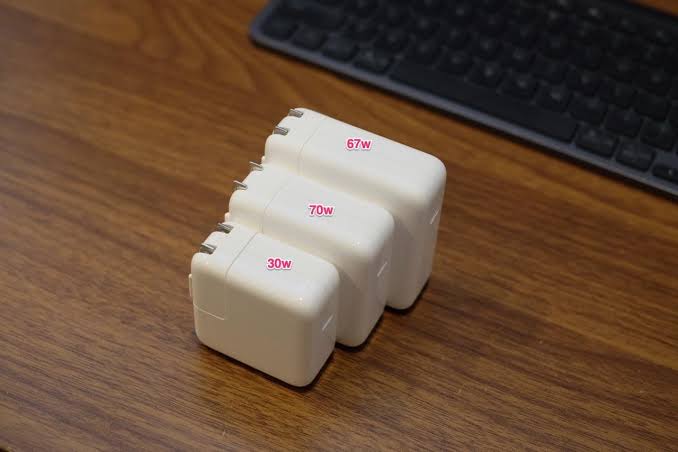

Modern electronic devices require reliable charging solutions that combine speed, safety, portability, and convenience. Whether you use a laptop for work, a tablet for studying, or a smartphone for everyday communication, choosing the right charger can make a significant difference in your daily routine. A 70W USB C charger is a versatile option for people who want to power multiple types of devices without carrying several separate adapters.
However, not every charger offers the same performance, compatibility, or build quality. Understanding important features such as power delivery, charging protocols, port configuration, and safety protection can help you select a charger that suits your needs. This guide explores the essential factors to consider when choosing the best 70W USB C charger for laptops, tablets, and smartphones.
Understanding What a 70W USB C Charger Offers
A 70W USB C charger can deliver up to 70 watts of power when connected to a compatible device and supplied with an appropriate cable. This power capacity makes it suitable for many everyday electronics, including certain laptops, tablets, and smartphones.
USB-C describes the connector type, while USB Power Delivery (USB PD) is a charging standard that allows compatible devices and chargers to negotiate an appropriate power level. Together, these technologies support flexible charging across a wide range of electronics.
A 70W charger can be particularly useful for people who frequently move between home, school, the office, and other locations. Instead of carrying different adapters for every device, users may be able to charge several compatible products with one compact accessory.
Nevertheless, maximum charging speed depends on the device’s supported charging specifications. A laptop that requires more than 70W may charge slowly under heavy workloads, while a smartphone designed for a lower wattage will draw only the power it supports.
Check Compatibility With Your Devices
Compatibility should be the first consideration when purchasing a 70W USB C charger. Before selecting a product, check the manufacturer’s charging recommendations for your laptop, tablet, and smartphone.
Laptop Compatibility
Many modern laptops support USB-C charging, particularly models designed for portability and everyday productivity. A 70W charger can provide suitable power for numerous lightweight laptops, office computers, and some performance-oriented models.
However, certain laptops require 90W, 100W, or more for their intended charging performance. Although a 70W charger may still work with some of these devices, charging could be slower, especially during demanding activities such as video editing or gaming.
Check the laptop’s original adapter specifications and confirm that the manufacturer supports USB-C Power Delivery charging before purchasing a replacement.
Tablet Compatibility
Tablets typically require less charging power than many laptops, making a 70W charger a practical option for compatible models. It can provide sufficient capacity for everyday tasks such as reading, watching videos, taking notes, and participating in online classes.
The tablet will generally regulate how much power it receives. Therefore, using a higher-capacity charger does not automatically mean the device will charge at 70W.
Smartphone Compatibility
Many smartphones support USB-C charging, but their fast-charging requirements vary considerably. Some models support USB Power Delivery, while others rely on manufacturer-specific charging technologies.
A 70W USB C charger may charge a compatible smartphone efficiently, but it will not necessarily deliver the phone’s advertised maximum charging speed. Check whether the charger supports the appropriate charging protocol for your particular device.
Look for USB Power Delivery Support
USB Power Delivery is an important feature when choosing a versatile charger. It enables compatible devices to negotiate suitable voltage and current levels instead of receiving a fixed amount of power regardless of their requirements.
For laptop users, USB PD support can make a charger more practical for everyday work. Tablet owners can benefit from convenient charging, while smartphone users may enjoy faster charging when their devices support compatible profiles.
Some chargers also advertise programmable power supply technology, commonly called PPS. This feature allows compatible devices to adjust charging voltage more precisely within supported ranges.
If you plan to use one charger across several devices, review its supported charging standards rather than relying exclusively on the advertised 70W output.
Consider the Number of Charging Ports
Port configuration determines how conveniently you can charge your devices. A single-port charger may deliver the full available output to one connected device, while a multiport model can charge multiple electronics simultaneously.
Single-Port Chargers
A single USB-C port is suitable for users who usually charge one device at a time. These chargers may offer a straightforward design and can be convenient for laptop owners who prioritize maximum available output through one connection.
Multiport Chargers
A multiport charger is useful when you need to charge a laptop, smartphone, and tablet throughout the day. However, you should examine the manufacturer’s power-distribution specifications carefully.
For example, a charger rated at 70W total may reduce the power supplied to each device when several ports are being used. This means your laptop might receive less than 70W while another device is connected.
Choose a configuration that matches your normal charging habits and check whether the charger clearly explains its simultaneous output limits.
Evaluate Charging Speed and Efficiency
Charging speed depends on more than the charger’s maximum wattage. The connected device, battery condition, charging cable, temperature, and charging protocol all influence performance.
A compatible laptop may benefit from a 70W output during regular productivity tasks. Tablets and smartphones may also charge efficiently when the charger’s supported output matches their requirements.
It is worth remembering that charging speeds usually decrease as a battery approaches full capacity. This behavior helps manage temperature and protect battery longevity.
Look for a charger with clear technical specifications and credible performance information. Avoid assuming that a product will charge every device at its maximum advertised speed simply because it carries a high wattage rating.
Choose a Compact and Portable Design
Portability matters for students, remote workers, business travelers, and anyone who regularly carries electronic accessories.
A compact 70W USB C charger can reduce clutter in a backpack or laptop bag. Some models use gallium nitride technology, commonly known as GaN, which can help manufacturers create smaller, efficient power adapters.
However, GaN technology alone does not guarantee superior performance. Compare the charger’s dimensions, weight, plug design, and heat-management features before deciding.
If you frequently travel internationally, check the input-voltage range and plug compatibility. You may need a suitable travel adapter, and you should always verify that the charger supports the electrical supply in your destination.
Prioritize Safety and Build Quality
Safety is essential when selecting any charging accessory. A well-designed charger should include appropriate electrical protections and comply with the relevant safety requirements for its intended market.
Important protective features may include overcurrent protection, overvoltage protection, overheating protection, and short-circuit protection.
Purchase from a reputable manufacturer or retailer and look for clear product documentation, warranty information, and applicable safety certifications. Certification markings should be genuine and appropriate for the country where the product is sold.
Build quality also deserves attention. A durable casing, secure USB-C ports, and a well-designed plug can improve everyday usability. Avoid products with unclear specifications, suspiciously low pricing, or exaggerated claims about universal compatibility.
Select the Right USB-C Cable
Even an excellent 70W charger cannot deliver its intended performance if the cable is unsuitable.
Choose a cable rated for the power level you intend to use. For a 70W charging setup, a suitable USB-C cable should explicitly support at least that power level. A properly rated 100W cable is another option, provided it meets the relevant USB-C specifications.
Some higher-power USB-C cables include electronic identification components that communicate their capabilities to compatible equipment. This helps the charging system determine whether the cable can safely support the requested power.
If you also need high-speed data transfer or external display support, check those specifications separately because charging capability does not guarantee equivalent data or video performance.
Compare Price, Warranty, and Long-Term Value
The cheapest charger is not always the most economical choice. An inexpensive product with unreliable performance may need replacement sooner or fail to provide the compatibility you require.
Compare several models based on their maximum output, charging protocols, number of ports, size, warranty, and customer support. Reviews can help identify recurring concerns about heat, durability, or inconsistent charging, although individual experiences should not replace technical specifications.
A charger from a reputable brand may offer better documentation and more dependable support. Consider how frequently you will use it and whether it can serve your devices as they are upgraded over time.
Paying for useful features is sensible, but there is little reason to spend extra on capabilities that do not match your needs.
Conclusion
Choosing the best 70W USB C charger for laptops, tablets, and smartphones requires more than comparing wattage and price. Compatibility, USB Power Delivery support, port configuration, cable quality, portability, and safety features all contribute to a reliable charging experience.
Start by checking the power requirements of your devices, then select a charger that supports their charging standards and offers sufficient output for your everyday activities. Consider a multiport design if you regularly charge several devices, and choose a properly rated cable to help achieve the expected performance.
With careful research, a 70W USB C charger can become a practical accessory for work, study, travel, and home use. By prioritizing dependable construction and genuine compatibility over exaggerated marketing claims, you can make a more informed purchase and enjoy a convenient charging solution for your compatible electronics.
